We are now in the second JavaScript and now, I realized that JavaScript is better than HTML. JavaScript uses dialog boxes to interact with the user. The dialog boxes are created with three methods:
- alert()
- prompt()
- confirm()
Alert Box
 An alert box is often used if you want to make sure information comes through to the user. When an alert box pops up, the user will have to click "OK" to proceed. http://www.w3schools.com/js/js_popup.asp

Prompt Box
 The prompt() method displays a dialog box that prompts the visitor for input. A prompt box is often used if you want the user to input a value before entering a page.

Note: When a prompt box pops up, the user will have to click either "OK" or "Cancel" to proceed after entering an input value. Do not overuse this method, as it prevent the user from accessing other parts of the page until the box is closed. The prompt() method returns the input value if the user clicks "OK". If the user clicks "cancel" the method returns null.
http://www.w3schools.com/jsref/met_win_prompt.asp
Confirm Box
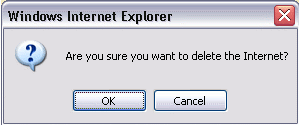 The confirm() method displays a dialog box with a specified message, along with an OK and a Cancel button. A confirm box is often used if you want the user to verify or accept something.
Note: The confirm box takes the focus away from the current window, and forces the browser to read the message. Do not overuse this method, as it prevent the user from accessing other parts of the page until the box is closed. The confirm() method returns true if the user clicked "OK", and false otherwise.
http://www.w3schools.com/jsref/met_win_confirm.asp


No comments:
Post a Comment